CloudThinker × Terraform: Day-2 Operations for the Full IaC Lifecycle
The first apply is easy. A platform engineer writes a clean module, the pipeline runs, the resources come up green. Then time passes. The cluster autoscaler edits node-group sizes. A database engineer lowers an Aurora capacity ceiling in the console during an incident because the on-call can't wait for a merge request. A file system provisioned in one throughput mode turns out wrong for the workload and gets switched by hand. The state file stops describing production, and the next plan either overwrites someone's hot-patch or quietly carries the drift forward.
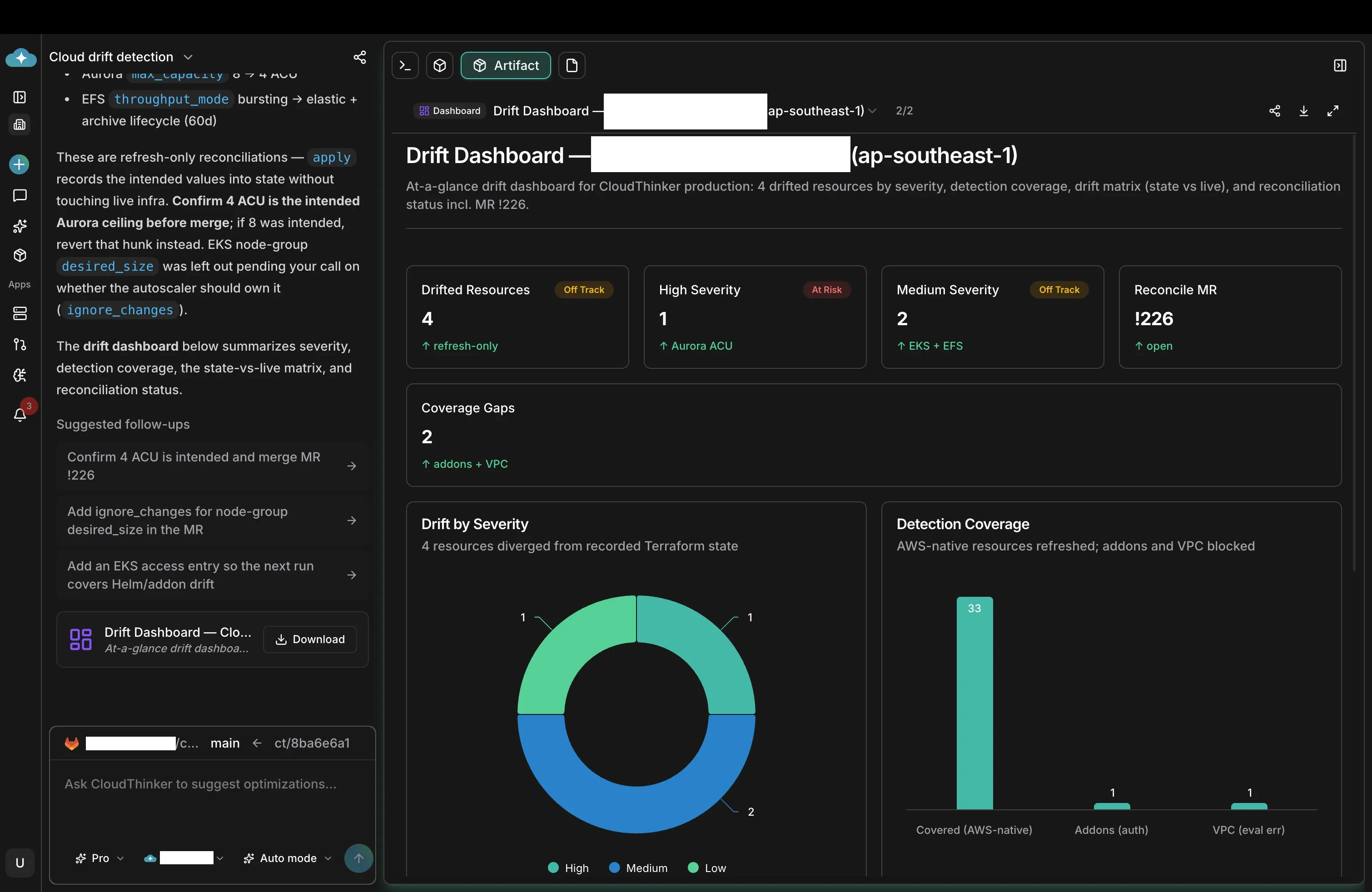
Terraform tells you what differs only when someone runs it, and it never tells you what to do about it. CloudThinker closes both gaps: a scheduled Automation runs a refresh-only plan, reads state, the live cloud and telemetry for every drifted resource, and hands the team one reviewed merge request. The walkthrough below is illustrative; the dashboard screenshot is real.
The setup
The walkthrough assumes a common shape: HCL and shared modules in GitLab or GitHub, workloads in an AWS Organization (Amazon EKS, Aurora Serverless v2, EFS), and a team that works in Slack or Microsoft Teams. The platform team owns the modules. The on-call owns whatever got changed in the console at 2 a.m.
Why the state file drifts away from production
None of this is a Terraform flaw. Terraform compares code, state and the cloud when someone runs it. The gap is everything that happens between runs.
Plans run when someone opens a merge request. A workspace nobody has touched in six weeks hasn't been asked what changed in six weeks. Drift piles up silently and surfaces all at once, in the middle of an unrelated change.
The console is faster than the pipeline. During an incident, the console is often the right call. Nobody writes the change back to HCL afterward, so the next apply reverts the fix.
Some fields were never Terraform's to own. Autoscalers, managed upgrades and AWS-managed defaults change fields legitimately. Terraform fights them on every plan unless someone tells it not to.
A drifted plan needs context it doesn't carry. "Aurora max_capacity 8 to 4" is a one-line diff. Whether to accept it depends on utilization history, cost, and who changed it and why. That knowledge usually lives with two senior engineers.
Where CloudThinker fits
01Code and cloud
IaC estate
 GitLab or GitHubHCL, modules, merge requests
 AWS OrganizationsLive resource state and metrics
 Amazon EKSNode groups, addons, autoscaler
- Terraform stateThe last recorded intent
Nothing installed in the cluster
02Lifecycle
 CloudThinker
- Plan reviewPolicy and per-resource analysis
- Drift detectplan -refresh-only on a schedule
- ReconcileCode forward, cloud back, or ignore
- Right-sizeCapacity diffs from utilization
Runs in a sandbox
03Where the team works
Chat and MR queue
 Slack or TeamsDashboard and summary per run
- Merge requestOne reconciliation per run
- ApproverA human on the merge button
Same pipeline as every change
CloudThinker reads the repository, the AWS accounts and the cluster through Connections. For AWS that's an IAM role locked to an External ID, so CloudThinker gets short-lived STS credentials; start it with read-only permissions. Nothing is installed in the cluster, and commands such as terraform plan run in CloudThinker's Sandbox.
Across the lifecycle, the work splits like this:
- Plan. Each merge request gets a policy and per-resource read (database capacity, EKS workloads, security posture) before the human reviewer sees the diff.
- Drift detect. On a schedule, a refresh-only plan against the live account feeds a drift dashboard.
- Reconcile. Intentional drift brings the code forward. Accidental drift gets the inverse. Runtime-owned fields leave Terraform's hands.
- Right-size and deprecate. Capacity is checked against real utilization, and idle resources get a proposed
terraform destroyplan for a human approver.
Every write, from opening a merge request to applying a refresh-only plan, goes through Auto Mode, so you decide what runs on its own and what waits for approval. A human always merges.
One drift run, end to end
01Detect
Refresh-only plan
Asks where live has moved away from state, without proposing changes to live.
02Evidence
Three sources
State, live API and telemetry for each drifted resource.
03Decide
Who owns the field
Adopt live, restore code, or hand the field to the runtime.
04Approved
Merge request
One per run, each hunk linked to its evidence.
05Close
Clean baseline
The next run starts from state that matches production.
This is what the on-call sees at the end of a scheduled run: which resources drifted, how severe, and what was opened as a result.
1. Ask where live has moved. CloudThinker runs terraform init in the sandbox, then a refresh-only plan against the live account:
terraform plan -refresh-only -out=drift.tfplan
terraform show -json drift.tfplan \
  | jq '.resource_drift[] | {address, actions: .change.actions}'
-refresh-only is the safe way to ask "where has the cloud moved away from state?" It compares state with live and proposes no changes to live resources. In this run, four resources drifted: one high severity, two medium, one low.
2. Read each drift against three sources. The same resource gets a different answer from each system that observes it.
01Intent
Terraform state
What the last apply recorded. A memory, and the lowest authority of the three.
02Configuration
Live cloud
What the AWS API reports right now, including console hot-patches.
03Behavior
Telemetry
What the workload actually does: utilization, throughput, scaling history.
When they disagree, state has the lowest authority: it's a memory of intent, not a measurement. So each drift gets the evidence a reviewer would ask for (utilization figures are illustrative):
- Aurora
max_capacity8 to 4 ACU (high). Someone lowered the Serverless v2 ceiling. CloudWatch shows peak usage under 3 ACU for 30 days, so 4 looks deliberate and safe. It could also be an incident-time mistake. CloudThinker can't know intent, so the merge request says so: confirm 4 ACU is the intended ceiling before merge, or revert that hunk if 8 was right. - EFS
throughput_modebursting to elastic, plus a 60-day archive lifecycle (medium). The two changed together, which fits: EFS Archive storage needs Elastic throughput. Access patterns support it. Adopt live. - EKS node group
desired_size(medium). The autoscaler changed it, and will again. This one gets a different answer, covered below.
3. Surface what it couldn't see. EKS addons were blocked on authentication (no access entry for the drift role yet), and the VPC module failed on an evaluation error. Both show on the dashboard, and the follow-up proposes the access entry so the next run covers addon drift.
4. Open one reconciliation merge request. For drift you keep, the merge request updates the HCL to match live, and terraform apply -refresh-only writes live values into state without touching infrastructure. For accidental drift, the code stays and a normal apply puts the cloud back. Every hunk links to its evidence:
resource "aws_rds_cluster" "orders" {
  # ...
  serverlessv2_scaling_configuration {
    min_capacity = 0.5
    max_capacity = 4 # was 8; lowered in console, confirm intent before merge
  }
}

resource "aws_efs_file_system" "exports" {
  throughput_mode = "elastic"

  lifecycle_policy {
    transition_to_archive = "AFTER_60_DAYS"
  }
}
5. Post and wait. A summary lands in Slack or Teams with the dashboard, the merge request link and the open questions. The team reviews and merges, and the next run starts from a clean baseline.
Knowing when not to reconcile
Some fields belong to the runtime, not to IaC. An EKS node group's desired_size is the standard case: the autoscaler edits it as workloads scale, and re-applying Terraform would fight it on every plan. The right answer is to take the field out of Terraform's hands:
resource "aws_eks_node_group" "workers" {
  # ...
  scaling_config {
    desired_size = 3
    min_size     = 2
    max_size     = 10
  }

  lifecycle {
    ignore_changes = [scaling_config[0].desired_size]
  }
}
The same logic covers RDS minor versions with auto minor version upgrade on, EKS addon versions managed outside Terraform, and any field a managed service owns by design. The merge request explains the reasoning in a comment, so the next engineer knows why the field is ignored. That judgment is what separates a domain-aware reviewer from a lint rule.
What changes
The run above is illustrative, so this section doesn't put numbers on it. What changes is the shape of the work:
- Drift becomes routine, not an incident. Reconciliation merge requests land between standups, and the on-call stops discovering drift in the middle of a P1.
- Console fixes stop getting reverted. A hot-patch you keep comes back as HCL through a reviewed merge request.
- The plan means what it says. Plans go from "many changes I didn't make" to "the change I'm proposing," so reviewers can trust the diff.
The closest published proof is F88, whose operations team now runs on CloudThinker across AWS and on-premises:
"CloudThinker investigated issues from a few months back whose root cause we never understood. Now our operations team works agent first, with CloudThinker."
Gia Hieu Dinh, CIO, F88
Why this beats the traditional approach
| Traditional Terraform workflow | With CloudThinker | |
|---|---|---|
| Drift detection | Discovered in the next unrelated plan | Scheduled refresh-only runs with a dashboard |
| Evidence | A one-line diff with no history | State, live API and telemetry per resource |
| Runtime-owned fields | Fought on every apply | Moved to ignore_changes with the reasoning |
| Console hot-patches | Reverted by the next apply | Written back to HCL through a reviewed merge request |
| Coverage gaps | Invisible | Reported, with a fix proposed for the next run |
The deeper difference is that Terraform answers "what differs" and leaves "what should we do about it" to whoever reads the plan. That second question needs utilization history, ownership and judgment about who owns each field. It's the work CloudThinker does before the merge request reaches a reviewer.
Getting started
Connect the IaC repository and the AWS account, then ask from Slack, Teams or the CloudThinker chat:
"Inventory every Terraform workspace I have connected. Give me a per-region resource breakdown and flag any state that hasn't been refreshed in the last 24 hours."
"Run a Terraform drift check on production every hour. Post the dashboard to #platform-ops. Propose only: don't open reconciliation merge requests yet, I want to review the first few runs by hand."
When the team is ready, let one action run on its own:
"For the production drift check, open one draft reconciliation merge request per run without asking first. Attach the dashboard and evidence to the description. Merging still needs human review."
Next step: connect your IaC repository and AWS account, and schedule the hourly drift check. Automation explains how scheduled runs work and report.
Steve Tran, CTO, CloudThinker