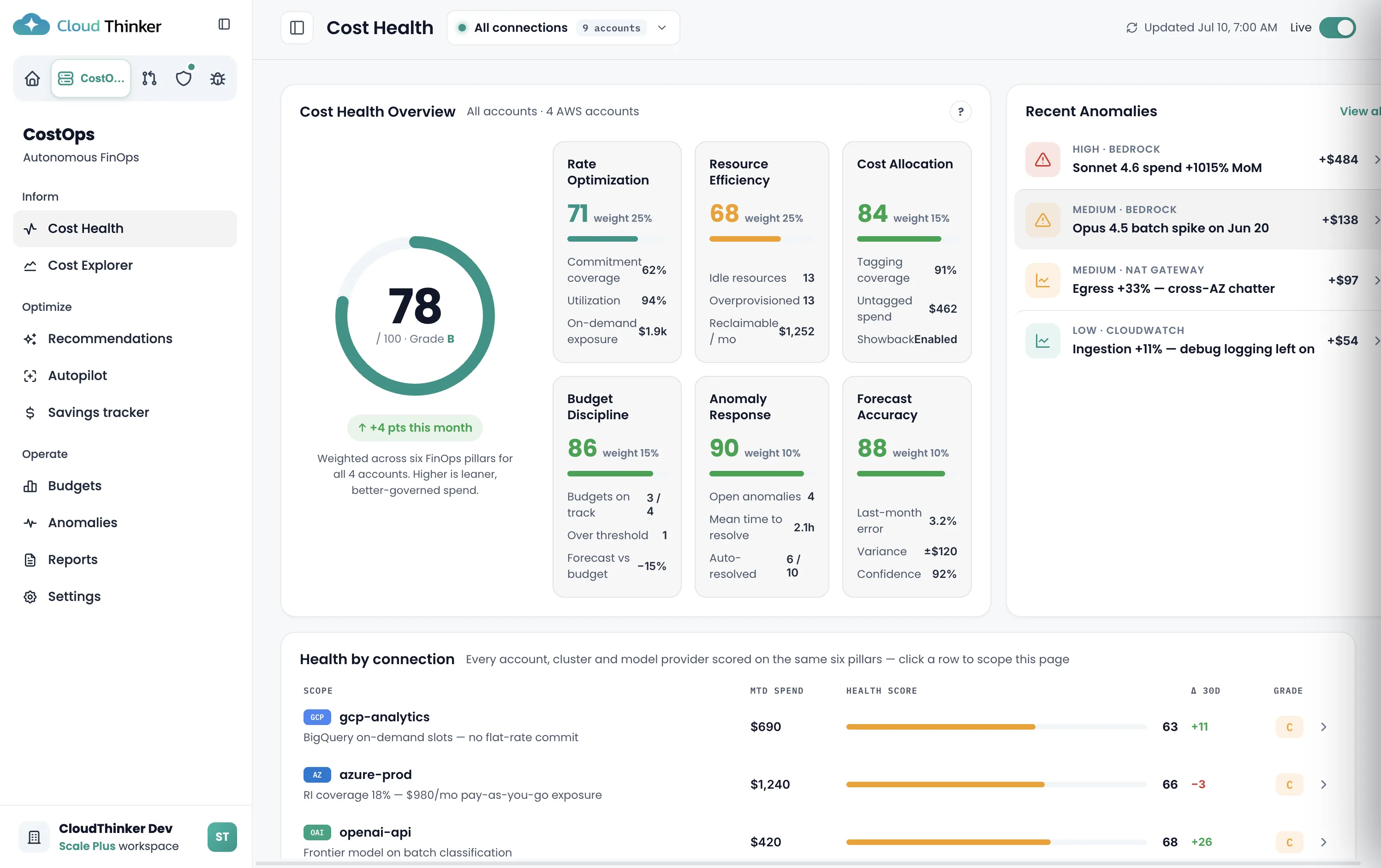
See where your cloud spend leaks in minutes.
Frontier Investigation Agents read up to 13 months of your AWS, GCP or Azure billing and rank what's idle, oversized or under-committed, each with an estimated monthly saving. Connect read-only. Nothing in your cloud changes.
- Read-only access, revoke any time
- First findings in 10 to 40 minutes
- Every finding tied to a real resource
- SaveRight-size RDS db.r5.2xlargeProposed
- SaveRelease 14 idle EC2$4.8k/mo
- SaveDelete unattached EBS$2.1k/mo
What teams saved after connecting.
“30% cost down and 40% higher performance after using. Two things I love are its knowledge and correction. As an expert, it understands problems clearly and makes proper decisions in minutes.”
Verified User in Financial Services
Enterprise, via G2
Rated on G2
Across verified customer reviews: cost, security, and incident response.

30%
Lower AWS spend
F88, through continuous cost and resource optimization.

50%
Lower RDS replica cost
Nextpay, on the RDS read replicas behind its payment apps.
“Streamlined cost management, issue identification, and incident reporting.”
Anh D.
CISO, via G2
Trusted by cloud teams and ecosystem partners








From connect to savings in under an hour.
Connect
One read-only role: ReadOnlyAccess on AWS, Viewer plus BigQuery read on GCP, or Reader plus Cost Management Reader on Azure. Nothing to deploy.
Discover
Agents pull up to 13 months of billing history, then check each billed service with read-only commands to find what is idle, oversized or under-committed.
Quantify
Each finding comes with its evidence, an estimated monthly saving, the effort and the risk. Nothing is resized or deleted.
Readout
A 30-minute call with a FinOps engineer: the top three savings ranked by impact, and one priced recommendation. The report is yours either way.
A report worth the meeting it starts.
Everything is yours to keep, whether or not you ever buy anything.
Cost map and health score
Where spend goes by service and region, a forecast for this month, and a Cost Health score out of 100 against the FinOps Framework.
Waste findings
Each finding tied to a real resource (idle instances, unattached volumes, oversized databases, old snapshots), with an estimated monthly saving.
Commitment coverage gaps
Where Reserved Instances, Savings Plans, committed use discounts or Azure reservations under-cover steady usage: the on-demand premium you keep paying.
Three savings to ship first
The three findings worth the most, each with the change, the effort and the risk, scoped so your team can ship them this sprint.
Shareable report
A written cost report in your workspace, with a share link for your CFO or the finance review asking where the savings are.
30-minute readout
A walk-through with a FinOps engineer that ends with exactly one priced recommendation, never a sales sequence.
Built to pass your security review first.
Read-only, always
The role is read-only, so nothing can be resized, released or deleted. Scope it to the accounts you want covered, and revoke it when we are done.
Estimates, not changes
Each saving is an estimate from your billing and usage data, and nothing is applied. The total is an upper bound, since findings can overlap.
SOC 2 Type II
CloudThinker is SOC 2 Type II audited. Self-hosted deployment is in early access for regulated teams.
Every command in view
Open the scan as a conversation and watch each command it runs. On AWS, every call also shows in your own CloudTrail under the CloudThinker role.
What finance and platform teams ask first.
- What access do you need?
- One read-only role per account. On AWS that is the managed ReadOnlyAccess policy, which covers Cost Explorer and the resource reads the scan needs. On GCP it is Viewer plus BigQuery read on your billing export, and on Azure it is Reader plus Cost Management Reader. A billing-only policy works too, with fewer resource-level findings. Revoke it any time.
- Is it safe to run against production?
- Yes. The role is read-only, so nothing is resized, deleted or changed during the assessment. The scan reads your billing data and runs read-only commands against each billed service to estimate what a change would save.
- What happens to our billing data?
- The billing rows, findings and Cost Health results are stored in your workspace, so pages and reports load without calling your provider again. We don't train models on your data. Turn off the daily refresh to make it a one-time look, and delete the data or revoke the role at any time.
- How fast is it, really?
- Setup takes a few minutes. The first scan pulls up to 13 months of billing history and runs for 10 to 40 minutes in the background. AWS Cost Explorer can lag usage by 24 to 48 hours, so the last day or two may be missing. Readout calls with a FinOps engineer are capped each week. If the week is full, you get the next open slot.
- What does the assessment cost?
- Nothing. The assessment is free, and the report is yours to keep. If your procurement team needs a contract before granting access, we can issue a nominal fee that is fully credited against your first program.
- What happens after the readout?
- You get exactly one priced recommendation, based on what the assessment found. There is no obligation. The cost map, the findings and the report are yours to keep either way.
Your cloud bill won't wait.
Drop your email, connect a read-only role, and see your first savings, each with an estimate, in under an hour.
- Read-only access
- Findings in under an hour
- No obligation