
Ship daily. Pentest each deploy. Introducing CloudThinker AppSec
An annual pentest can't keep up with code that changes hourly. CloudThinker AppSec is a pentest team that tests every release, proves each finding with a safe real exploit — then opens the fix as a merge request.
Today we are introducing AppSec, a new module on the CloudThinker AgenticOps platform. It turns application penetration testing from a point-in-time engagement you buy once or twice a year into continuous assurance that runs on every deploy — driven by a governed Security Agent, bounded by rules you set, and delivered as evidence and a patch instead of a PDF.
The problem: security coverage decays after every untested release
Manual application pentests are usually scheduled once or twice a year. The result is a point-in-time view of a system that no longer stands still. AI-assisted development has compressed the release cycle by three to five times, and every new route, dependency, and deploy reshapes the attack surface the moment the last report was written.
The gap is not a lack of testing. It is the untested time between a code change and the next scheduled assessment:
- Common cadence — 1–2× per year. A strong report still describes the version that was tested, not every release that ships afterward.
- Every deploy changes risk. New code, routes, and dependencies age static coverage immediately.
- Typical report lag — 2–4 weeks. Findings arrive after the engagement, then still need triage, reproduction, and routing.
- Coverage goes stale after one deploy. One release past the tested snapshot, the report is already describing history.
Why today's options don't close it
Speed, depth, and continuity rarely come together in one tool.
Automated scanners are fast and continuous and strong at pattern detection — but they create noisy queues without runtime proof, auth and business logic put most of the surface out of reach, and they usually stop at an alert that an engineer still has to investigate.
Human pentests are deep and contextual and excel at creative attack paths — but scheduled capacity limits how often they run, the tested snapshot ages after the next release, and remediation still lands on your team.
CloudThinker AppSec complements both: continuous agentic testing, safe proof-of-concept validation, and remediation evidence routed into the workflow you already use.
What AppSec is
Continuous application pentesting, driven by a governed Security Agent. Three properties define it:
Tests every release
24/7, CI/CD triggered.
Proves every finding
Proof-gated, near-zero false positives.
Ships the fix
Patch + code context, not a PDF.
The assurance loop: Discover → Prove → Route → Retest
AppSec is a loop, not a scan. Every retest updates posture and creates an auditable record of what was found, changed, and verified.
- Discover. Maps endpoints, roles, and inputs, then re-tests on every deploy — no scheduling required.
- Prove. Validates each candidate with a read-only exploit. Only proven, ranked findings surface.
- Route. Adds source context, severity, owner, and a suggested patch — ready for engineering review.
- Retest. Re-runs the exploit once the fix merges, and closes the finding only when it can no longer reproduce.
A verified cross-tenant access bug looks like this end to end — a safe proof-of-concept that confirms the exposure without changing any data:
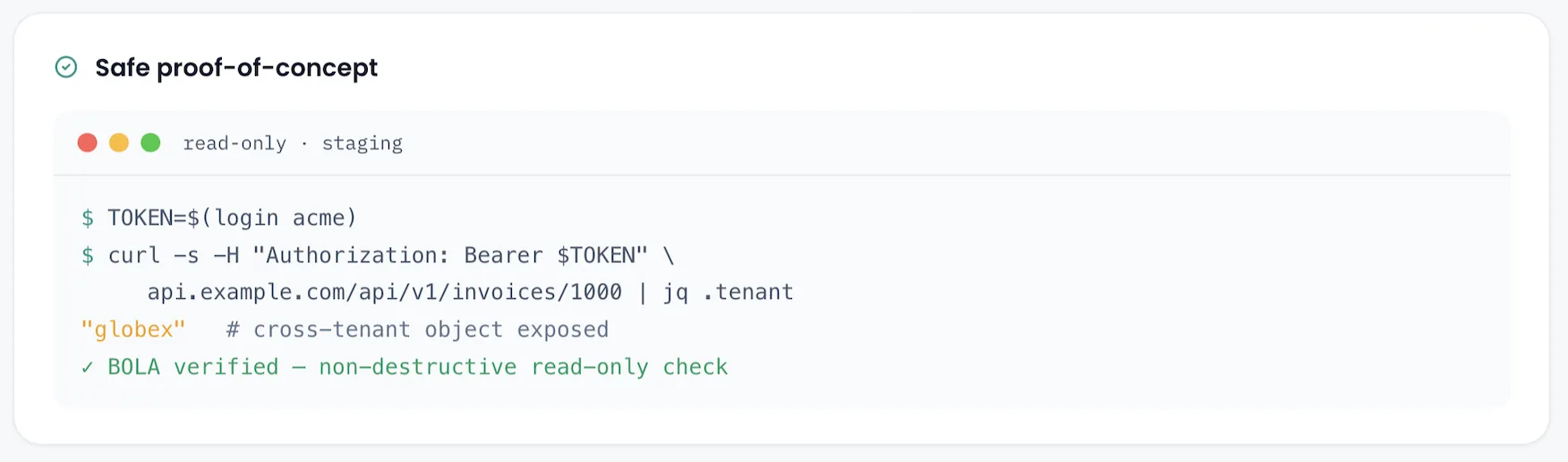
A safe, read-only proof-of-concept run against staging: a curl request replays another tenant's invoice ID and returns data belonging to a different tenant, confirming a BOLA finding with a non-destructive read-only check.
...and the same finding arrives with a code-level remedy, opened as a merge request against the exact file and line:
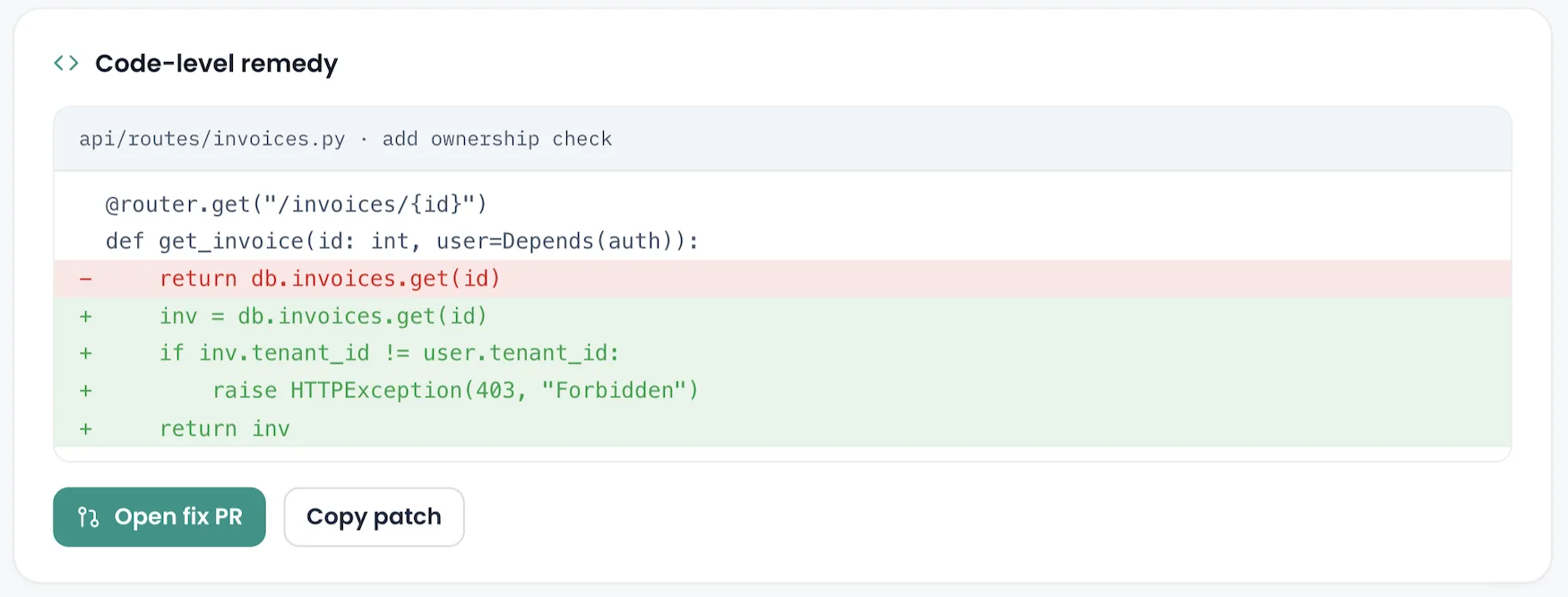
A code-level remedy for the BOLA finding: a diff on api/routes/invoices.py adds an ownership check comparing the invoice tenant to the caller's tenant before returning it, with an Open fix PR button.
Six security specialists, one governed workflow
AppSec is not a single monolithic scanner. A Security Agent orchestrator coordinates specialist tests and routes evidence across the surface:
- Code & Web — SAST, DAST, and attack-path chaining.
- Infrastructure — cloud, containers, and configuration.
- Knowledge — data, APIs, and business logic.
- Identity — IAM, tokens, and credentials.
Each specialist is scoped to a clear part of the attack surface, and the orchestrator correlates their low-severity findings into the multi-stage attack paths a real pentester would chain.
You stay in control
You choose the depth, scope, access, and cadence of every run. Four dials govern how AppSec behaves:
- Intensity — Safe · Aggressive · Full. Controls whether the agent only reads, also writes test data, or exercises destructive paths.
Safeis read-only with zero blast radius;Aggressivecreates test records to reach deeper bugs;Fullexercises destructive flows for maximum coverage. - Scan scope — Incremental · Full. Test only what changed since the last run, or re-test the entire surface end to end.
- Access level — Black-box → White-box. Attach a scoped test identity, and optionally source, so the agent tests the way an insider attacker would.
- Schedule — On deploy · Daily · Weekly. Move from a one-off run to a recurring cadence that turns pentesting into continuous assurance.
Recommended defaults: run Safe on shared environments and Aggressive on dedicated staging; reserve Full for throwaway test environments. Pair Incremental on every deploy for speed with a Full scan weekly to catch drift and score posture. Gray-box is the sweet spot for most apps; use White-box for critical services where you want fixes drafted against real source.
Why aggressive stays safe
Safety is visible, scoped, and auditable at every layer:
Verified ownership
Rules of Engagement
Isolated execution
Ephemeral access
Data guardrails
Human approval + audit
No agent is installed inside your cluster. CI/CD triggers the run; approved connections provide context; evidence flows back into your existing systems.
Where it lands
The point of AppSec is not to replace human depth or scanner speed — it is to close the untested time between them.
| Annual human pentest | Automated scanner | CloudThinker AppSec | |
|---|---|---|---|
| Cadence | 1–2× per year | Continuous | Every deploy · 24/7 |
| Finds real bugs | Yes — deep | Rules-based, triage varies | Yes — proven by exploit |
| False positives | Very low | High | Near-zero, proof-gated |
| Proof of exploit | Manual, in report | None | Safe PoC, automated |
| Delivers a fix | No — a PDF | No — an alert | Evidence + suggested patch |
| Time to first result | 2–4 weeks | Minutes | Under 15 min typical run |
How it fits your workflow
AppSec fits the tools and trust boundaries you already run:
- Source & CI — GitHub, GitLab, GitHub Actions, GitLab CI. AppSec reads the diff and triggers after deployment.
- Targets & identity — AWS, Azure, GCP, Amazon EKS, and APIs, with verified targets, scoped identities, and explicit Rules of Engagement.
- Evidence & workflow — Slack, Microsoft Teams, Jira, email, and the CloudThinker Inbox, carrying proof, owners, SLAs, and suggested remediation.
Getting started
Start with one scoped run and expand only after the evidence earns trust:
- Verify & scope. Verify ownership; define in-bounds hosts, paths, identities, and allowed actions.
- Run the first test. Trigger a sandboxed run against staging and review only proof-backed findings.
- Approve the rules. Tune scope, credentials, severity policy, and routing with security and engineering.
- Add the CI/CD trigger. Fire after deployment and route evidence into Slack, Teams, Jira, or the CloudThinker Inbox.
No agent is installed inside your cluster. Start with staging, keep human approval in the loop, and expand scope only after the evidence earns trust.
Ship daily. Pentest each deploy. Explore CloudThinker AppSec or talk to our team to see whether it's a fit for your stack.